Schaudiagramm um einen Eltako S91-100 in einer Tasterschaltung zu verdrahten.
Ich konnte online kein einfaches Diagramm zum anschliessen finden, also habe ich schnell eins gezeichnet. Eine Tasterschaltung mit einer Lampe, einem Eltako S91-100 und beliebig vielen Tastern sieht wie folgt aus:
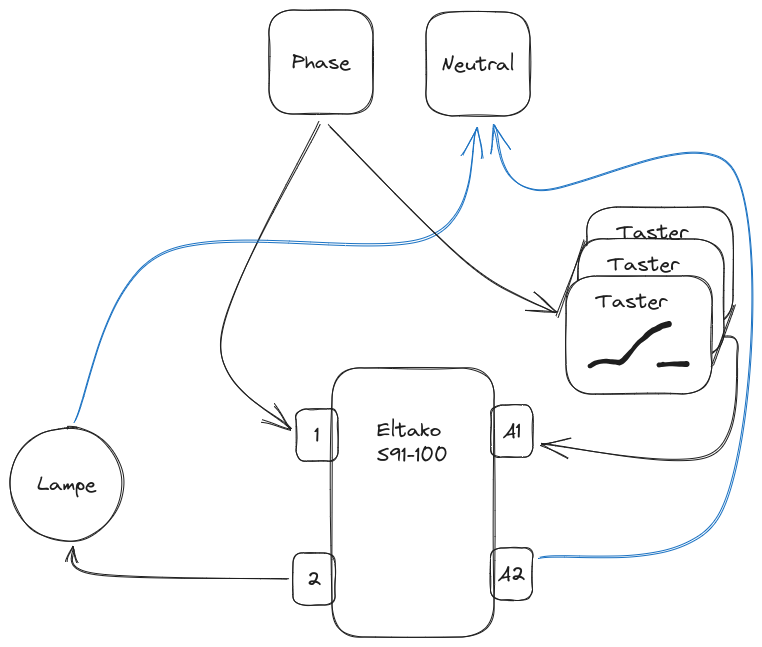
Der Eltako schaltet dann die Lampe bei jedem Tastimpuls (Tastendruck) zwischen dem ein- und dem ausgeschalteten Zustand hin und her.
Disclaimer: Ich bin keine Elektrikfachkraft und möchte hier niemanden auf dumme Ideen bringen. Strom im Haushalt ist gefährlich und kann bei mangelhafter Verdrahtung zu Bränden führen. Ich übernehme keine Verantwortung. Im Zweifel solltest du dir einen Elektriker organisieren.
Read More »
Short howto: store/restore state in HA
The problem: Automations sometimes need to store the state of several entities at once and then restore all of them at a later point in time.
An example of this is:
When I open my balcony door at night, I want the lights in my room to turn off.
when I close the balcony door, I want the lights to be restored to the exact same state they were previously.
Read More »
Short howto: package pinning on ubuntu
Sometimes you need to upgrade a server, but you also need to prevent apt from upgrading a specific package (eg. your node.js version). Many package-managers support this scenario under names like “version pinning” or “package holding”. This is how you prevent apt from upgrading a single package:
Dependencies
- Ubuntu 12.04 or newer
- apt
Pin a package to prevent it from being upgraded
sudo apt-mark hold $PACKAGE_NAME
Unpin a package to allow it being upgraded again
sudo apt-mark unhold $PACKAGE_NAME
Short howto: update all npm dependencies using jq and xargs
Dependencies
- node.js and npm (obviously)
- jq
- xargs (may needs to be installed manually)
Update all dependencies to their latest version:
cat package.json | \
	jq -r '.dependencies | keys[]' | \
	xargs -I {} npm i -S {}@latest
Update all devDependencies to their latest version:
cat package.json | \
	jq -r '.devDependencies | keys[]' | \
	xargs -I {} npm i -S {}@latest
Alias the commands for easier reuse
To reuse the commands without having to remember them just put them into your .bashrc or .bash_profile file.
Add this to the end of your bash configuration and restart your shell afterwards:
Read More »
Count git commits in a repository by author name
Today I learned how to count git commits in a repository by author name:
git shortlog -s -n --all --no-merges
Explanation:
git shortlog: summarize git log output-s: only count commits-n: sort by commit number instead of author name--all: count commits in all branches--no-merges: exclude merge commits
If you want to include author emails add -e
Sources: